Robust Tan Scaler Transformation
The Robust Tan Scaler (RTS) is a normalization technique designed for continuous variables with heavy-tailed or skewed distributions, where extreme outliers can otherwise dominate standard scaling or min–max normalization.
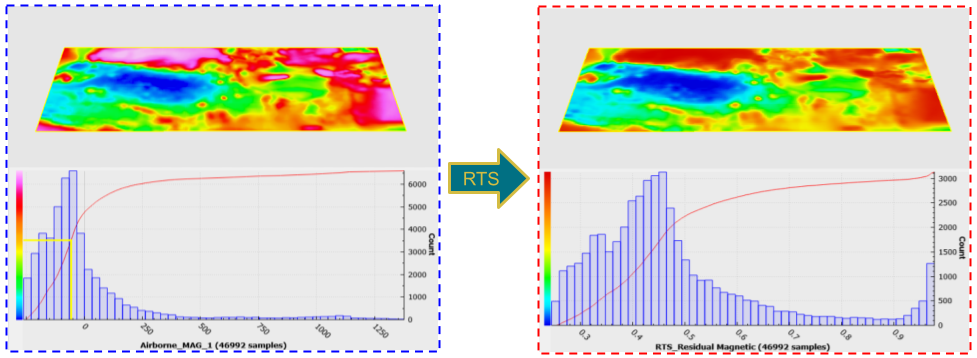
Fig. 1 Example of the RTS being applied to magnetic data dominated by large field values over a mineralized body.
In geoscience, datasets frequently contain anomalous values spanning several orders of magnitude, with a few extreme points masking subtler regional trends. For example, in magnetic data, highly magnetic geological formations can yield anomalies reaching thousands of nanoteslas (e.g., 1000-3000 nT), far exceeding the typical variations of tens to hundreds of nanoteslas found in surrounding areas. These extreme values may introduce instabilities in subsequent analyses and modeling processes. A plain min–max scaler would either compress most data into a tiny subrange or clip the tails entirely; a standard scaler can leave unbounded tails. The RTS gracefully compresses outliers toward the ends of the target interval, preserving continuity and order without harsh truncation.
The RTS applies a three‐stage, outlier-aware normalization to one or more numeric properties:
Standardize each property so that its values lie roughly in [-π/2, +π/2] (mean = 0, σ = π/2).
Tan-suppress the tails: values beyond ±π/2 are smoothly compressed toward ±π via a piecewise arctan function.
Min–max project the full range [-π, +π] into your desired window [min_val, max_val] (default [0, 1]).
Interface
The general parameters for the Robust Tan Scaler are shown in the figure below.
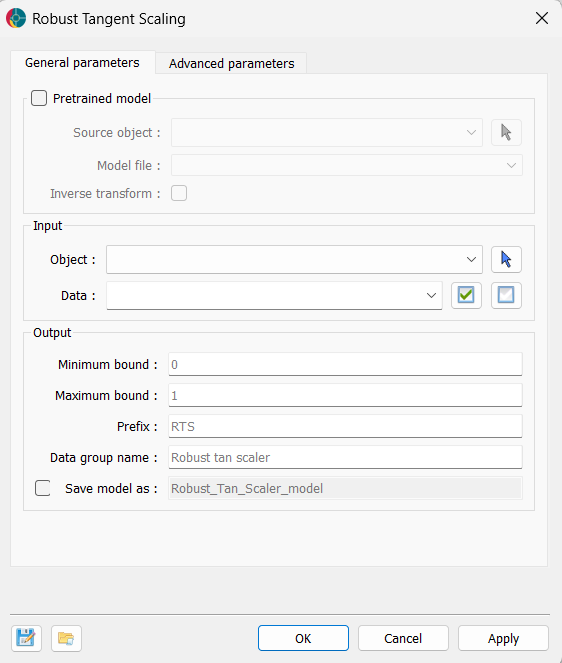
The options are described as follows:
Pretrained model (optional)
If a pretrained model is available, the application can use its weights to transform the data. This allows users to apply the same transformation to new datasets or to reverse the transformation if needed. Minimum bound and Maximum bound cannot be changed when a pretrained model is used, as the transformation is fixed.
Source object: The object containing the weights of a pre-trained RTS model. If a model is provided, the application will use the weights to transform the data.
Model file: If users have a pretrained model, they can load it here. The data the model was trained on must be present in the source object.
Inverse transform: If activated, the application will apply the inverse transformation to the data using the weights of a pre-trained model.
Input
Object: The object containing the dataset to be transformed using the Robust Tan Scaler.
Data: One or more Float data properties to scale.
Output
Minimum bound: Lower bound of the output range (min_val).
Maximum bound: Upper bound of the output range (max_val).
Prefix: Prefix added to each property name in the output group.
Data group name: Name of the new HDF5 property group created to hold the scaled data.
Save model as (optional): If activated, users have to define the name of the model to save in the source object.
Tutorial
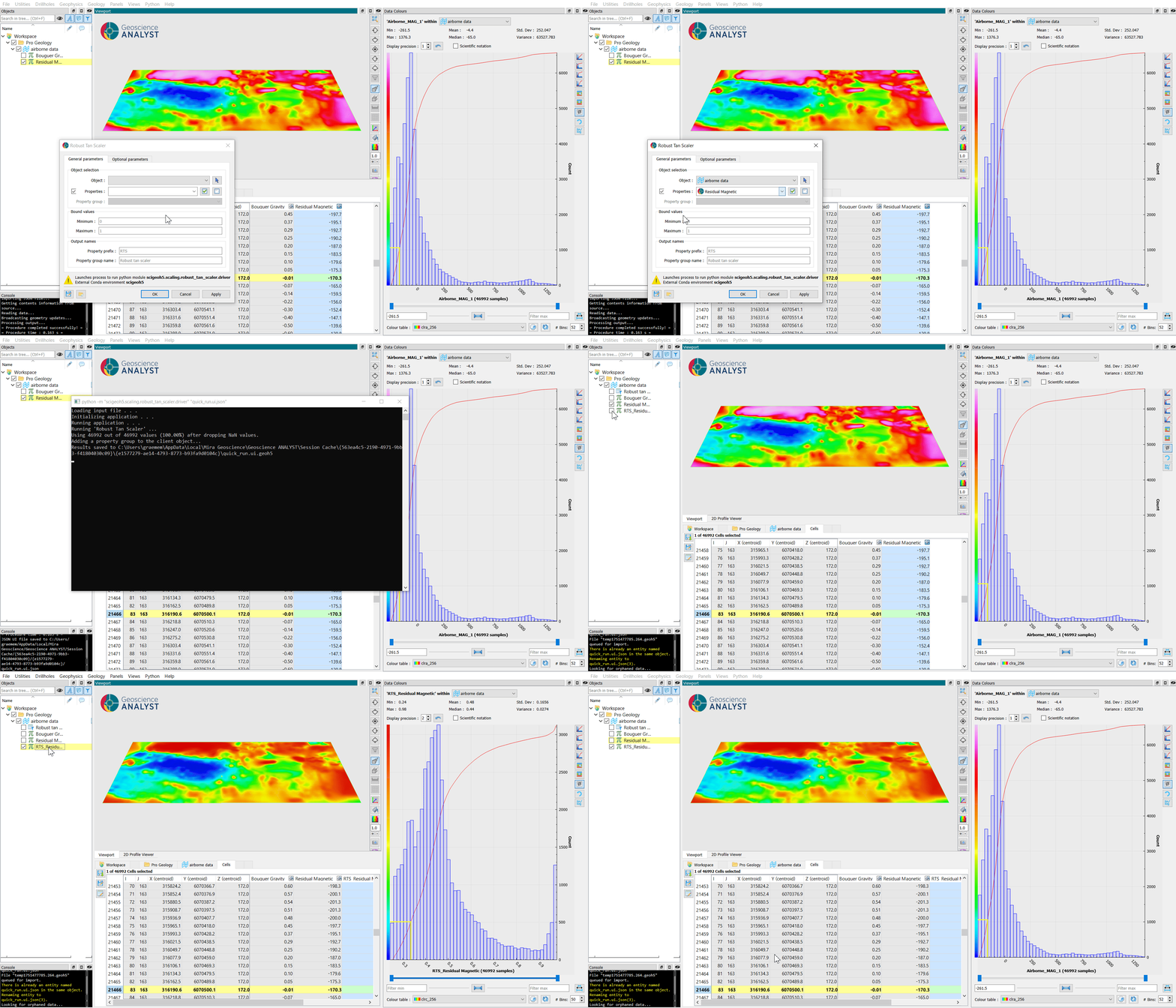
The following animated image presents a tutorial on how to use the Robust Tan Scaler application.
Launch Geoscience ANALYST and open your .geoh5 project.
Navigate to Geology > Robust Tan Scaler.
In the dialog, pick your Object and Data.
(Optional) Adjust Minimum bound and Maximum bound for the target range.
(Optional) Adjust Prefix or Data group.
Click OK to close the dialog and run the application, or Apply to run the application and keep the dialog open for further adjustments.
Inspect the transformed data.